How to test product onboarding with first-time users
Recruit likely users, write a task that avoids interface cues, and observe the first session. Separate independent success, assisted progress, and interpretation.

In this article
Test onboarding by asking people new to your product to complete a realistic task without teaching them the route. Recruit for the work and starting context, give a neutral task brief, and record where participants hesitate, fail, or need help. Keep observations separate from explanations, include relevant recovery paths, and check proposed fixes with fresh participants.
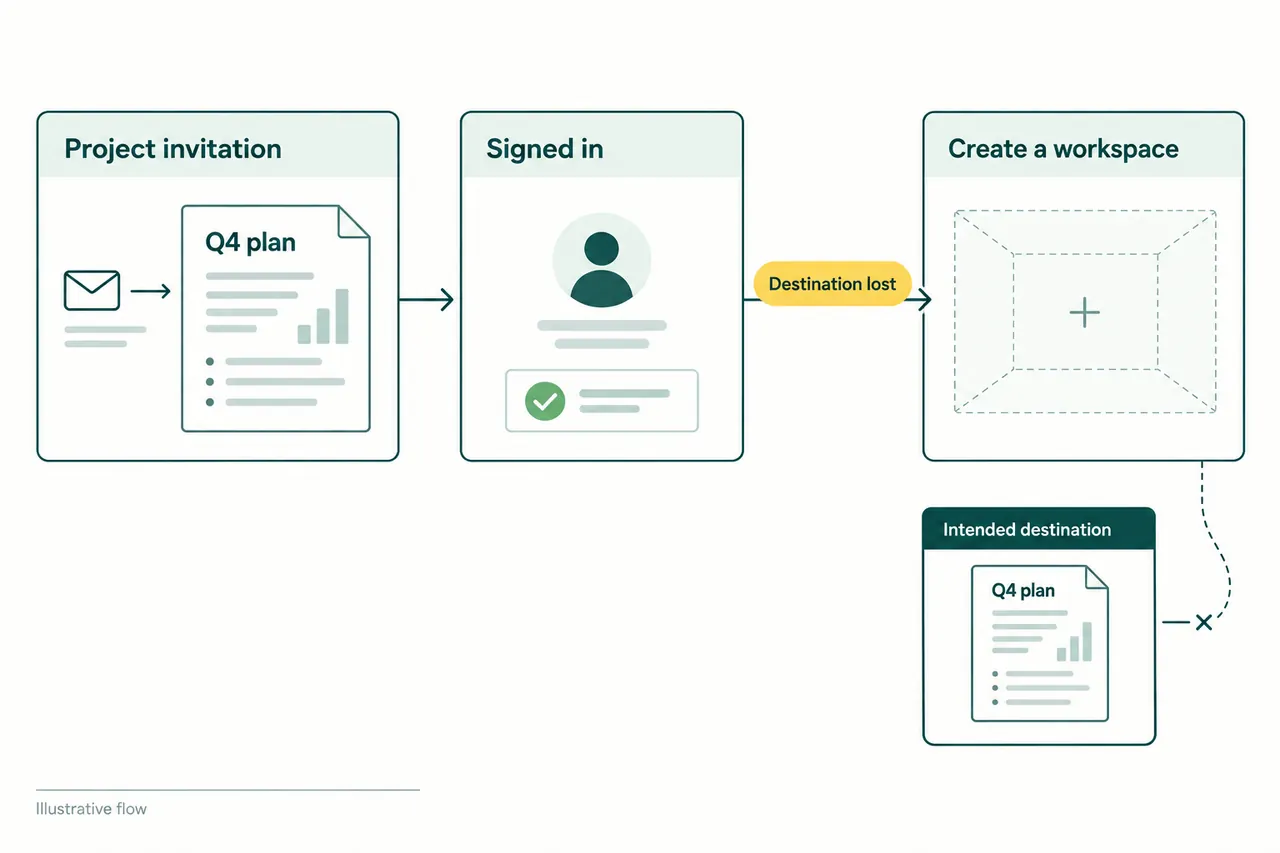
The participant stops at “Create a workspace.” You explain that a workspace is just where their project lives. They nod, click through, and finish the task. In the debrief, someone says the onboarding worked.
You have learned that the task works with a helpful colleague sitting beside the user. Whether the product explains itself remains unanswered.
First-use research is unusually easy to contaminate. The team knows every label, every prerequisite, and what happens after the next click. A new user knows none of that. The study has to preserve the gap long enough to see where it causes trouble.
Start with the decision you need to make
“Test the onboarding” is too broad to guide a useful session. Pick an uncertainty that would change the product. Can a new account owner tell whether importing data will affect the source? Does an invited teammate understand that a workspace already exists? Can someone identify a useful first action without watching the tour?
These questions suggest different participants and starting points. A person opening an invitation should start with the invitation, not the homepage. Someone evaluating an import needs a believable reason to move data and enough familiarity with that data to recognize a problem.
First-time users need not be beginners at the underlying work. A finance specialist can be new to your reporting tool and expert in reporting. Recruiting general novices because they are easier to find may send the team toward explanations its intended audience does not need, while missing the checks an expert expects.
The GOV.UK moderated usability testing guide recommends recruiting actual or likely users and agreeing the research questions before planning sessions. For onboarding, add prior product exposure to that screening. A person who has seen your demo or a previous prototype no longer provides a clean first encounter.
Write the destination, leave out the route
Suppose you are studying a meal-planning app. “Create an account, choose the family plan, and add three recipes” hands the participant a sequence of interface instructions. It tests whether they can execute that sequence.
A more useful hypothetical brief is: “You need to plan weekday dinners for your household. Use this service to put together a plan you would be willing to shop for.” Adjust the household details to something believable for the participant. Observe whether they can get started and recognize when they have a usable plan.
That brief still creates an artificial situation. Be honest about its limits. A participant may comply with an account requirement they would reject in ordinary life because they have agreed to help with research. Ask where they would normally stop, then treat that answer as an account of intention rather than proof of future behavior.
Avoid naming a feature in the brief if discovering it is part of the question. The Government Digital Service’s advice on moderation specifically warns against task cues and instructions that steer people toward success. Read your script with that risk in mind: “set up a shared board” already teaches two pieces of product vocabulary.
Give silence a chance
Explain the session and obtain consent for any recording before starting. Make clear that the interface is being evaluated and that stopping or criticizing it is useful. Ask the participant to describe what they are thinking, then resist filling every pause.
A pause can contain useful work. The person may be comparing options, checking a requirement, or deciding whether the service deserves access to their data. An immediate “Are you confused?” imposes your interpretation and may interrupt a sensible decision.
When you need more context, ask a neutral question tied to what just happened: “What were you expecting there?” or “What would you do next?” Save broader opinions for later. Questions such as “Was that easy?” tend to produce a verdict when you need an explanation.
Eventually, helping may be the right choice. A participant who is completely stuck cannot show you anything further downstream. Record the point of intervention and the help you gave. Continue the session, but describe later completion as assisted. The participant should not have to remain uncomfortable so the team can maintain a spotless protocol.
Keep the evidence small and exact
Write down the observable event before deciding what it means. Here is how a hypothetical import observation might develop:
| Layer | Example note |
|---|---|
| Observation | Participant opens the permission explanation, returns to the import button, and asks whether the source file will change. |
| Interpretation | The effect on the source may be unclear. |
| Proposed response | Explain the actual source-file behavior beside the import action. |
| Remaining question | Is the concern about editing the file, retaining a copy, or granting ongoing access? |
The distinctions keep a plausible guess from becoming an invented finding. “Users do not trust integrations” is a much larger claim than this observation supports. It also suggests a much larger redesign.
Capture the object involved, the action, and the consequence. If someone chooses the wrong workspace and then successfully imports into it, the task is not a clean success merely because the import event fired. Ask the participant to identify the result and explain whether it meets their goal.
Record contradictions as well. Someone may say an instruction is clear and then act on a different interpretation. Neither piece of evidence should disappear from the notes. The discrepancy is a reason to investigate, not a reason to decide that participants cannot be trusted.
Bring the failure paths into the study
A polished prototype often lacks the conditions that make real setup difficult. It accepts every file, has no expired invitation, and never requires approval from another person. Those omissions narrow what the study can establish.
Where recovery matters, prepare a realistic failure or incomplete input. Tell the participant anything they would actually know, but do not announce the solution. A file with a missing required column can reveal whether the explanation identifies the problem and whether the user understands what remains saved.
Use safe sample material when real data would create unnecessary exposure. Include the device and assistive technology people normally use when those conditions are relevant, and arrange the session around their access needs. A screen-share demonstration by the moderator is not equivalent to the participant operating the product.
Turn the study into a bounded product decision
Small qualitative studies can explain a failure in enough detail to repair it. They do not, on their own, establish how frequently that failure occurs across the customer base or how much revenue a fix will produce.
Prioritize findings by the blocked task and consequence. An invitation that routes people into the wrong account deserves attention even if only one participant encountered it. A disliked illustration that did not affect understanding is a different kind of issue.
Then change the part of the experience implicated by the evidence and test it with fresh participants. The people you just watched have learned the product, including the explanation you eventually supplied. Their second attempt can tell you something about recovery or learnability. It cannot give you back their first impression.
For an integration-dependent product, use an empty first dashboard as a concrete diagnostic case and observe whether a new customer can explain what is missing.
Sources
- GOV.UK Service Manual: Using moderated usability testing.
- Government Digital Service: Advice for better moderated usability testing.