Excalidraw onboarding teardown: first value before signup
A hands-on Excalidraw walkthrough follows a small diagram from blank canvas to export preview, examining contextual guidance and the limits of first-value signals.
In this article
Excalidraw lets a visitor begin with the thing they came to make. In our desktop walkthrough, we opened a blank canvas, drew two labeled boxes, connected them with an arrow, and reached an image export preview without signing in. The revealing part was what happened between those actions: guidance changed with the work, while account creation remained optional.
This is an observation of the public Excalidraw editor on October 5, 2026. The task was deliberately small: make a diagram labeled “Start” and “First value,” then prepare it for use elsewhere. We used a new Chrome tab and synthetic content. This is one walkthrough, not a study of novice users or evidence of Excalidraw’s conversion rate.
The starting screen already contains the work surface
The initial view placed a shape toolbar across the top of an empty canvas. Open, Help, Live collaboration, and Sign up were available in the center. Upgrade and Share sat at the upper right. We could choose Rectangle and draw immediately. No workspace name, role selection, or account form interrupted that path.
That arrangement gives a visitor with a clear task somewhere to act. Its limitation is equally specific: a person who does not know what to draw still has a blank canvas. Immediate access removes prerequisites; it does not supply a purpose. A useful comparison would separate people arriving with a diagram to make from people exploring an unfamiliar category.
The center of the canvas also warned that drawings were held in browser storage, that this storage could be cleared, and that work should be saved to a file. The project’s official overview independently describes browser autosaving. Here, continuity was explained before we had invested in the drawing.
That matters because “I can start without an account” and “I will be able to find this tomorrow” are different promises. The first screen made the boundary visible. We did not test a return visit, a browser reset, or recovery after lost storage.
Guidance appeared when there was something to guide
After the first rectangle, the welcome content disappeared. Controls for the selected shape appeared at the left, and a contextual hint offered Enter to add text. We followed that hint to label the rectangle. We then made a second labeled box and connected the two with the Arrow tool.
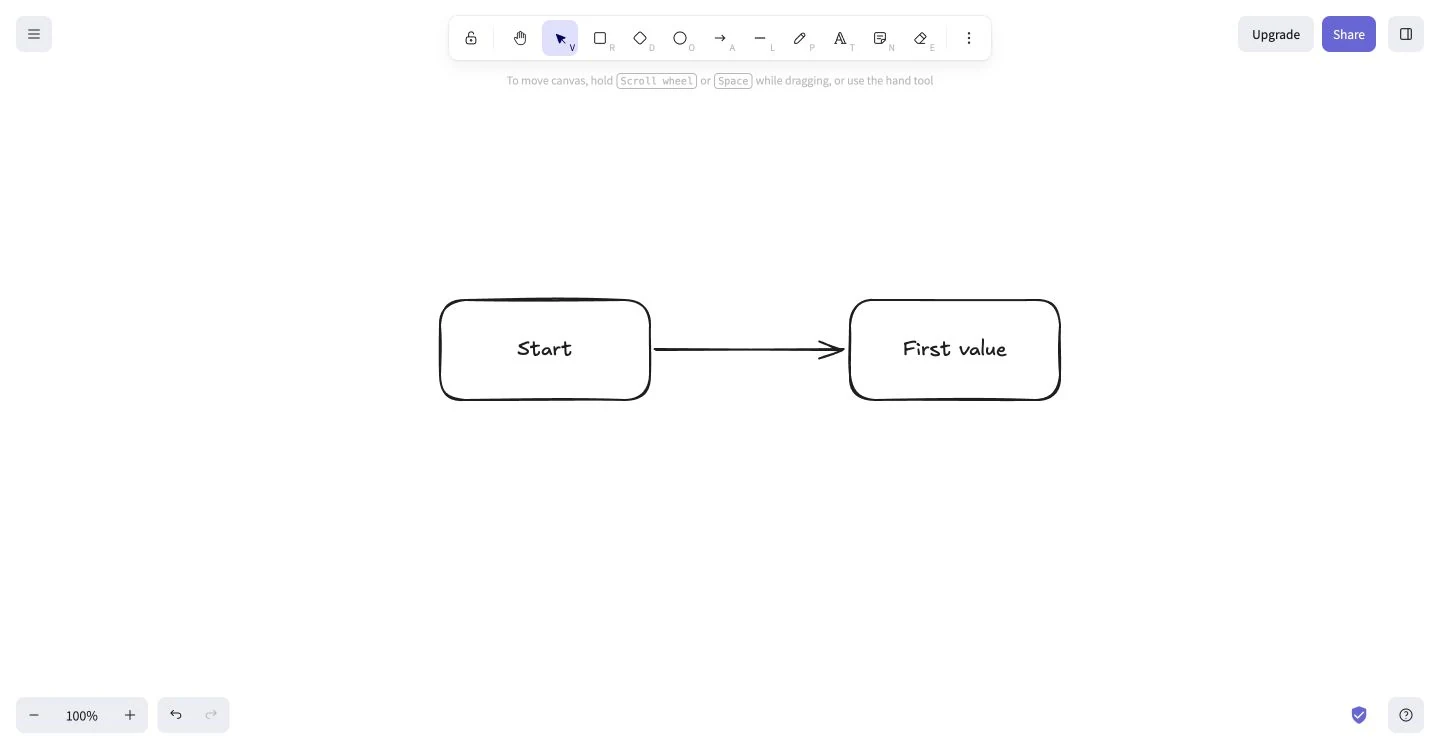
The sequence gave the guidance an immediate object. “Add text” referred to the selected rectangle. Stroke and background controls referred to a visible shape. The explanation did not require remembering an earlier tour of controls that had not yet been used.
That suggests a useful test for your own onboarding: can the next instruction point at a meaningful object the user has already made? If not, you may be teaching a future task too early. For products that require configuration before an object can exist, the equivalent could be a safe sample with a clearly identified next action.
A visible result still has to leave the product
We opened the upper-left menu and selected Export image. The dialog showed the actual diagram alongside PNG, SVG, and clipboard choices. Background, dark mode, scene embedding, and scale were adjustable. The observed scale was 2×.
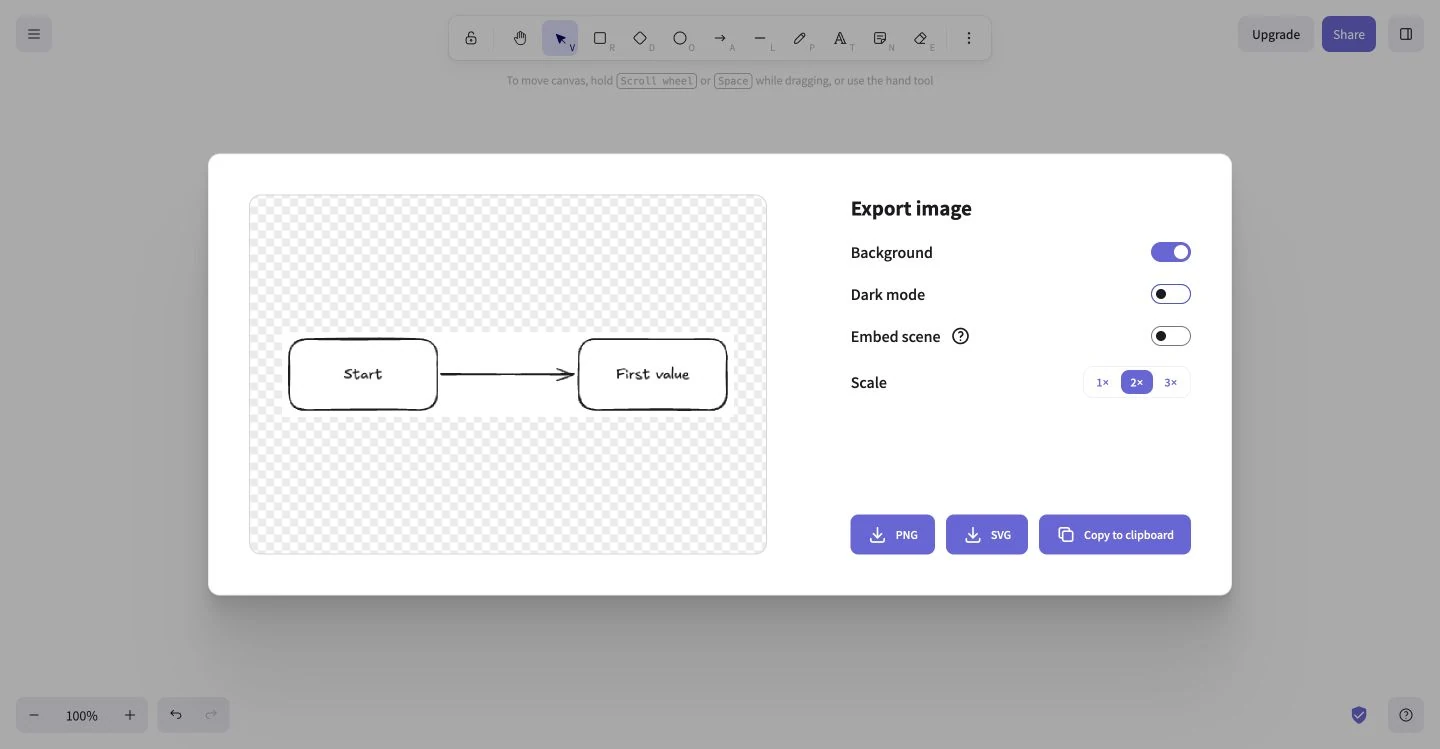
The project’s official feature list confirms PNG, SVG, and clipboard export. We also used Copy to clipboard; the button briefly changed to a check mark. Our observation ends at that confirmation. We did not independently reopen an exported file or verify its use in another application.
For onboarding measurement, those are useful distinctions. A first shape demonstrates that someone can operate a tool. A labeled relationship demonstrates a more meaningful use. An export or copy confirmation indicates an attempt to take the work onward. None alone proves that the diagram helped a colleague understand something.
Choose an activation signal that survives inspection
For this task, opening the editor would have been a weak success event. We could see the entire interface before making anything. Creating the first rectangle would have been stronger, but it still would not show whether the drawing communicated an idea. The labels and connecting arrow gave this particular artifact its meaning.
That does not mean every Excalidraw user should have to draw two boxes and an arrow. A useful sketch, wireframe, and process diagram have different structures. A rigid requirement could make a metric easier to calculate while excluding legitimate work. Start with the intended task, observe what a usable result looks like, and identify the smallest event combination that reliably represents it.
You can then follow the uncertain transitions. Did a person who created a meaningful artifact find the export menu? Did the preview show what they intended? Could they use the output in the destination that mattered? Did they understand how to preserve an editable version? The activation and time-to-first-value guide explains how to keep those definitions explicit. The aim is a defensible signal of progress, not a long checklist that everyone must complete.
What to borrow, and what to test
The illustrated product onboarding audit guide connects these observations to a broader review of starting state, useful result, and continuity. Keep the task you observed separate from a prediction about how other people will behave.
Excalidraw’s example is strongest when treated as a sequence: expose a useful action, let it produce a visible object, attach guidance to that object, and explain how the work can be kept or reused. Copying only the empty canvas would omit much of that sequence.
A focused experiment could offer a relevant starter diagram to visitors who lack a concrete task while preserving immediate drawing for those who have one. Measure whether people create an interpretable diagram and carry it into their intended work. Include return-and-recovery checks before deciding that the first session is complete.
Sources
- Excalidraw public editor, observed October 5, 2026; screenshots from our own synthetic task.
- Excalidraw official project overview and features, checked October 5, 2026, for browser autosaving and export support.
We did not test collaboration, paid plans, mobile interaction, account creation, retention, or recovery after storage loss. No business-performance claim follows from this walkthrough.